SMS Consent Process
AblePro Portal App provides optional text-message notifications to client-portal users and other individuals receiving services coordinated through AblePro Portal App. This page documents the opt-in process used by Ablepro, Inc. d/b/a AblePro Portal App.
Who sends the messages?
All messages covered by this program are sent by AblePro Portal App, operated by Ablepro, Inc. d/b/a AblePro Portal App.
Messages may concern a recipient’s client-portal account, appointments and scheduling, service updates, billing or payment notices, security, and customer support. Businesses may use AblePro Portal App to coordinate the underlying services, but these SMS messages are sent under the AblePro Portal App messaging program.
How recipients opt in
- A recipient first becomes a client of a business that uses AblePro Portal App for scheduling and invoicing. That business enters the recipient’s name and mobile phone number into AblePro Portal App as part of setting up the service relationship. No SMS consent exists at this point — the phone number is on file solely to coordinate the recipient’s services and portal account.
- The recipient is given their own login to an AblePro Portal App client portal associated with services coordinated through AblePro Portal App.
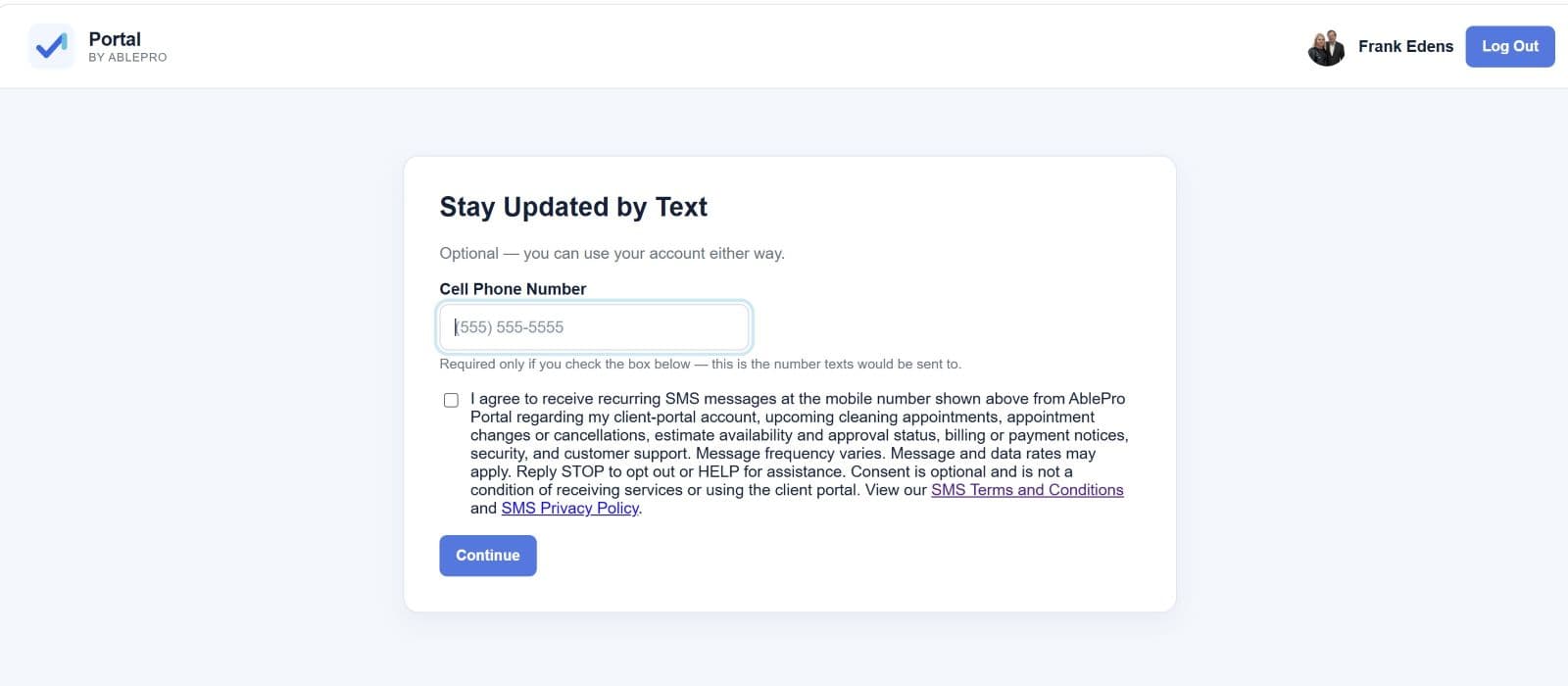
- After signing in, the recipient is shown the optional Stay Updated by Text screen.
- The SMS consent checkbox is unchecked by default.
- The recipient must affirmatively select the checkbox to consent to SMS messages.
- The recipient can select Continue without checking the box and can use the client portal and receive services without consenting to text messages.
- The screen links directly to the SMS Terms and Conditions and SMS Privacy Policy.
Consent language shown to recipients
I agree to receive recurring SMS messages from AblePro Portal App regarding my client-portal account, appointments and scheduling, service updates, billing or payment notices, security, and customer support. Message frequency varies. Message and data rates may apply. Reply STOP to opt out or HELP for assistance. Consent is optional and is not a condition of receiving services or using the client portal. View our SMS Terms and Conditions and SMS Privacy Policy.
Opt-in screen
The screenshot below shows the optional consent screen presented to client-portal users. The checkbox is not selected, and the recipient may continue without opting in.
Consent records
When a recipient selects the checkbox and continues, AblePro Portal App records information necessary to document the opt-in, including the mobile number and account identifier, the date and time of consent, the source of the opt-in, and the version of the consent language presented. AblePro Portal App also records opt-out requests so they can be honored.
Opting out and obtaining help
Recipients may opt out at any time by replying STOP. After opting out, a recipient may receive one confirmation message and will receive no additional messages under this program unless new consent is provided.
Recipients may use our contact form.
Program policies
Mobile telephone numbers, SMS opt-in data, and SMS consent will not be sold, rented, transferred, or shared with third parties or affiliates for their marketing or promotional purposes.
Program operator
Ablepro, Inc. d/b/a AblePro Portal App
Messaging brand: AblePro Portal App
SMS Terms and Conditions
SMS Privacy Policy
LET'S TALK ABOUT YOUR BUSINESS
See what a calmer, more connected workday could look like.
Tell us what you run today and what is slowing you down. We'll show you how Portal can fit your team.